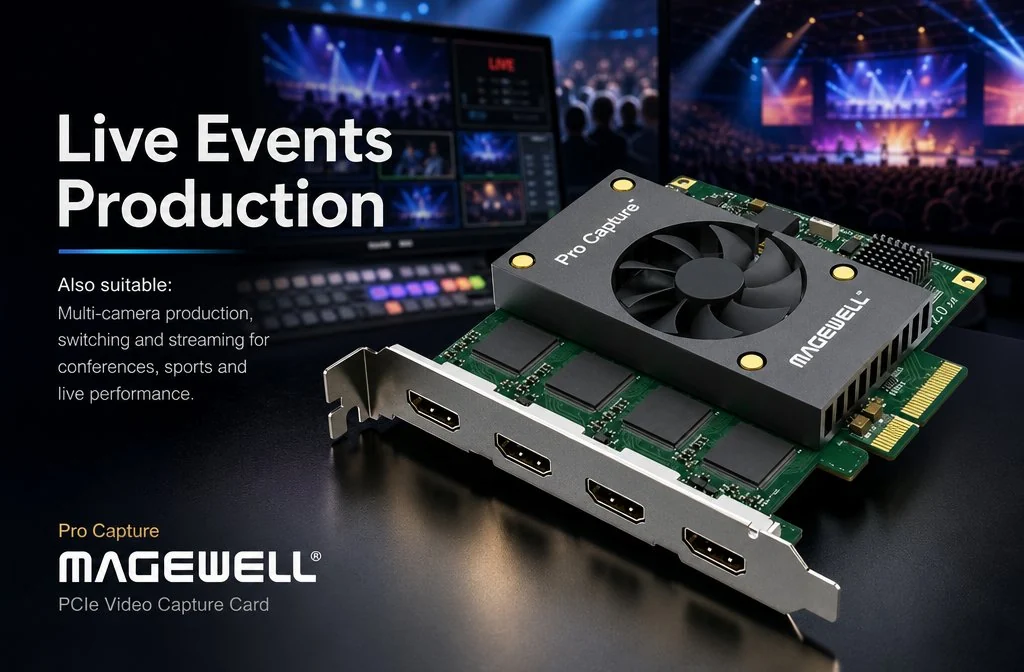
Capture · Record · Stream · Encode · DecodeCapture · Record · Stream · Encode · Decode
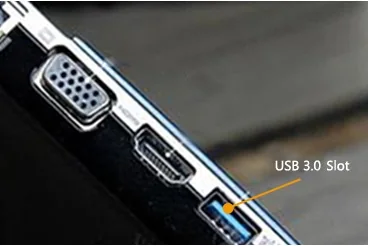
A capture card reaches the computer in one of two ways: a PCIe slot inside the case, or a USB port on the outside. PCIe gives each slot its own dedicated bandwidth, which makes it the better choice for several channels at once and for uncompressed 4K. USB is easier to fit, because the port is on the outside of every desktop and laptop, but a USB 3.0 port carries less data than a multi-lane PCIe slot. In short: choose PCIe for multi-channel and high data rate work in a desktop or server, and USB for portability. The rest of this article explains PCIe and what it means when you choose a capture card.
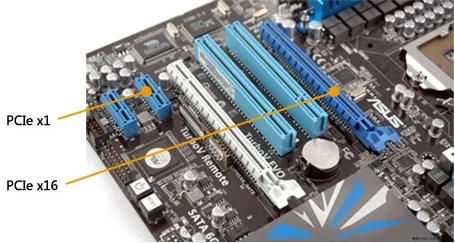
PCI, the Peripheral Component Interconnect bus, was developed by Intel in the early 1990s and became the standard expansion bus in PCs and servers for more than a decade. Motherboards today rarely include a PCI slot. PCIe has replaced it, and current video capture cards are built for PCIe. Every card in the Magewell Pro Capture range is a PCIe card.

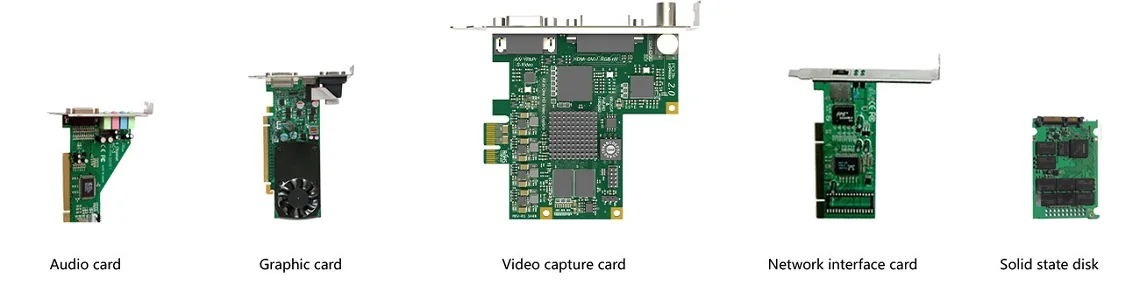
PCI Express, abbreviated to PCIe, is the bus that replaced PCI. Intel proposed it in 2001 under the working name 3GIO (third-generation I/O). The industry body PCI-SIG adopted the specification and named it PCI Express in 2002. Besides video capture cards, PCIe is used for graphics cards, solid-state drives, network cards and audio cards, so every modern desktop and server has it.
PCIe replaced PCI for three main reasons:
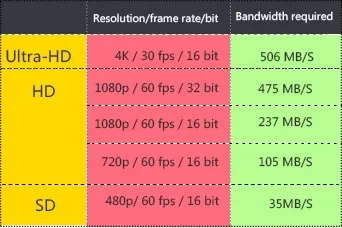
Uncompressed video is a lot of data, and the amount rises quickly with resolution and frame rate. As a guide, in the common 8-bit 4:2:2 format (YUY2, two bytes per pixel), 1920×1080 at 60 frames per second is about 250 MB/s, 3840×2160 at 30 frames per second is about 500 MB/s, and 3840×2160 at 60 frames per second is about 1,000 MB/s. A capture card has to move that much data to the computer, continuously, for every channel it captures.
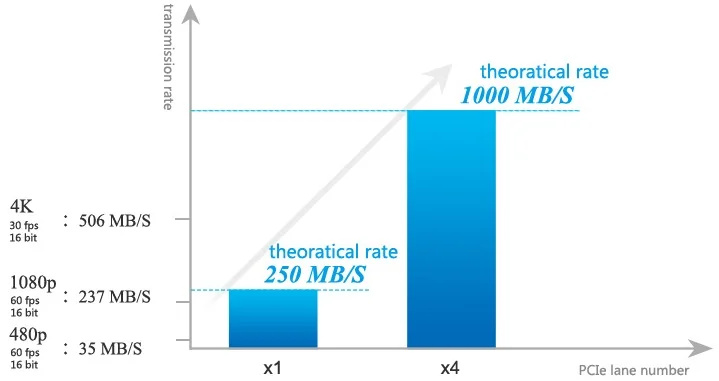
PCIe slots and cards come in widths of x1, x4, x8 and x16, where the number is the count of lanes. In first-generation PCIe each lane carries about 250 MB/s in each direction, so in theory x1 carries 250 MB/s, x4 about 1,000 MB/s and x16 about 4,000 MB/s. Real transfer rates are somewhat lower, because of protocol overhead and the motherboard and chipset. The data rate a card has to move decides how many lanes it needs. Magewell’s range shows the pattern. Single-channel HD cards such as the Pro Capture HDMI, and the six-channel standard-definition Pro Capture Hexa CVBS, use a PCIe x1 connector. Four-channel HD cards such as the Pro Capture Quad HDMI, and single-channel 4K cards such as the Pro Capture HDMI 4K Plus, use x4. Two-channel 4K cards such as the Pro Capture Dual SDI 4K Plus use x8.
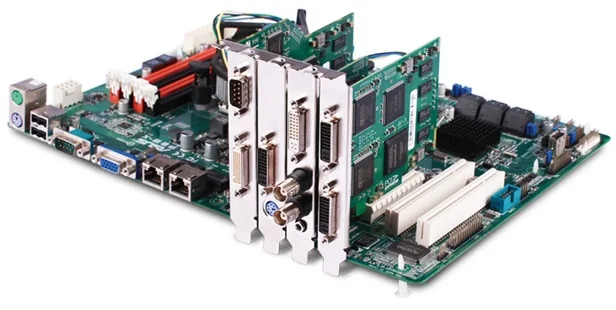
A motherboard may have PCIe slots of x1, x4, x8 and x16 width. A PCIe card fits a slot of its own width or any wider one. If the x1 slots are all in use, an x1 card works in an x4, x8 or x16 slot, which helps when slots are short. Check wide slots before you rely on them, though: some slots that are physically x16 are wired with fewer lanes, and a card only gets the lanes the slot provides. As long as there are enough slots, several PCIe capture cards can run in the same computer at the same time, each with its own bandwidth. This is how multi-channel systems are built: several Magewell cards in one machine, each appearing to the software as its own capture device or devices.
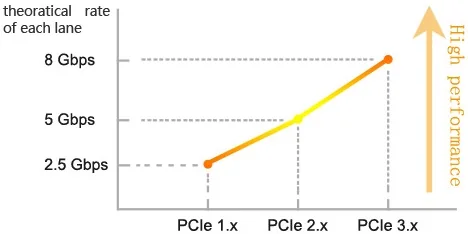
PCIe has been revised several times. PCIe 2.x doubles the per-lane rate of PCIe 1.x to about 500 MB/s, and PCIe 3.x roughly doubles it again. Newer generations continue the pattern. The generations are compatible in both directions: a PCIe 2.x card works in a 1.x slot and in a 3.x or later slot, and the link runs at the speed of the slower of the two. Magewell’s Pro Capture cards are PCIe Gen2 designs. The effect of the slot generation is clear from the figures for the 4K Plus cards: about 1,600 MB/s per channel in a PCIe 2.x system, and about 800 MB/s in a PCIe 1.x system. An x1 HD card such as the Pro Capture HDMI moves about 400 MB/s in a PCIe 2.x system. For HD capture almost any slot will do. For 4K at 60 frames per second, put the card in a PCIe 2.x or newer slot that provides all the lanes the card uses, so the card has its full transfer rate.
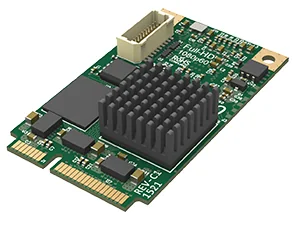
Two smaller formats use the same PCIe technology. Mini PCIe is a compact single-lane card format found in industrial PCs, embedded systems and digital signage players. Magewell’s Pro Capture Mini HDMI and Pro Capture Mini SDI are Mini PCIe cards measuring 30 × 51 mm, each with a PCIe Gen2 x1 interface. M.2 is the slot most people know from solid-state drives, and it also carries PCIe. Magewell’s Eco Capture cards fit a 22 × 80 mm M.2 slot with a PCIe connection, which puts capture inside small-form-factor computers that have no room for a standard card. An M.2 slot wired only for SATA drives will not run a PCIe capture card, so check the slot type first.
Website disclaimer: The information in this article is for general guidance only. Information relating to other companies belongs to them. If you have comments or suggestions about this article, please email info@magewell.com.
ForeFront Imaging is the authorised UK distributor for Magewell. We stock the full range and can help you spec the right solution.
Browse Products Talk to UsNo marketing noise. Just new product launches, firmware updates, and the occasional guide.
No spam. Unsubscribe any time. Your email is never shared.
Enjoying your visit? Quick rating of your browsing experience so far:
Anything specific? (optional)