Capture · Record · Stream · Encode · DecodeCapture · Record · Stream · Encode · Decode
Start with the connector on your source. HDMI is found on cameras, computers, games consoles and most AV equipment. SDI is found on professional broadcast cameras, routers and vision mixers, and runs over long locking BNC cables. If your sources vary from job to job, the USB Capture AIO accepts SDI, HDMI, DVI, VGA, component, composite and S-Video in one device, using the supplied breakout cables. It captures one source at a time.
The USB Capture HDMI Gen 2 accepts sources up to 2048×1080 at 60 fps, which covers 1080p60. The USB Capture HDMI Plus accepts a 4K source and scales it down, capturing up to 2048×2160. To capture 4K itself over USB, choose the USB Capture HDMI 4K Plus, which captures 4K at up to 30 fps, or the USB Capture HDMI 4K Pro, which captures 4K at 60 fps over a USB 3.2 Gen 2x2 (up to 20 Gbps) connection. For PCIe, the Pro Capture HDMI 4K takes 4K over HDMI 1.4 and the Pro Capture HDMI 4K Plus captures 4K at 60 fps.
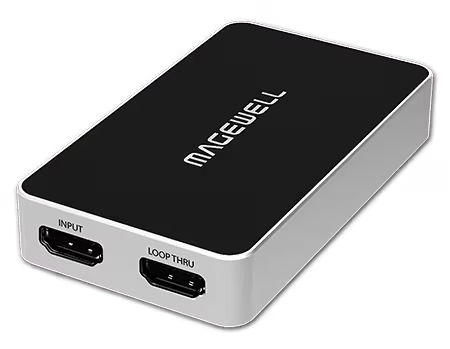
Loop-through passes the incoming signal on to a monitor or projector while you capture. Gen 2 models have no loop-through. The USB Capture HDMI Plus, SDI Plus, 4K Plus and 4K Pro models do, and the HDMI 4K Plus passes 4K at 60 fps to the monitor while it captures. If your source has only one HDMI output and you also need it on a screen, choose a model with loop-through and save buying a splitter. Among the Pro Capture HDMI cards, only the LT models (HDMI 4K Plus LT and Dual HDMI 4K Plus LT) have loop-through.
USB Capture devices are portable, powered from the USB port and driver-free on Windows, macOS, Linux and Chrome OS. Pro Capture PCIe cards fit inside a desktop or server, which keeps a permanent installation tidy and secure. For multi-channel capture PCIe is the practical choice: one Pro Capture card carries up to four HDMI or SDI inputs, and several cards can share one system.
Portable, single HDMI up to 1080p60, no monitor needed: USB Capture HDMI Gen 2
Portable, single HDMI, with a monitor on the loop-through: USB Capture HDMI Plus
Portable, 4K capture at up to 30 fps, 4K60 loop-through: USB Capture HDMI 4K Plus
Portable, 4K capture at 60 fps (USB 3.2 Gen 2x2 connection): USB Capture HDMI 4K Pro
Mixed signal types, one source at a time: USB Capture AIO
Permanent installation, single HDMI: Pro Capture HDMI
Four HDMI channels in one PCIe slot: Pro Capture Quad HDMI
No marketing noise. Just new product launches, firmware updates, and the occasional guide.
No spam. Unsubscribe any time. Your email is never shared.
USB Capture devices are small external boxes that connect by USB. They are powered from the USB port and install without a driver on Windows, macOS, Linux and Chrome OS, which suits laptops and single-source capture. Pro Capture cards are PCIe cards fitted inside a desktop or server. Cards are available with one, two or four HDMI or SDI inputs, and several cards can be fitted in one system, so it suits fixed installations and multi-channel capture.
A capture card brings video into a computer for recording, streaming or analysis. A Pro Convert device puts video onto your network, or takes it off again, without a computer: for example an encoder that turns an HDMI camera into an NDI source, or a decoder that feeds a network stream to a screen. If you need the video inside software on a PC, choose a capture card. If you need it on the network, choose a Pro Convert.
For most people a USB Capture device is the simplest choice. The USB Capture HDMI Gen 2 for HDMI or the USB Capture SDI Gen 2 for SDI plugs in, needs no driver and appears in OBS Studio as a video source. For several cameras in one desktop PC, or for 4K at 60 fps, a Pro Capture card is the better fit. Our Find My Product tool will suggest a model for your set-up.
Choose USB Capture for portability: it connects over USB 3.0, needs no driver and moves easily between computers. Choose Pro Capture for a fixed workstation or server, especially when you need more than one channel. A Pro Capture card is held in a PCIe slot inside the case, so there is no external box or USB cable to be knocked out, and Pro Capture cards have very low capture latency (64 video lines).
Choose Pro Convert when the source and the computer are in different places. A Pro Convert NDI encoder such as the Pro Convert HDMI Plus converts an HDMI or SDI signal to NDI on your Ethernet network, so any NDI-capable computer on that network can use the source. A USB Capture device needs the source cabled to it, and the device plugged into the computer.
For a single camera or the output of a vision mixer, with no PC, the Ultra Stream HDMI is the easiest option and the Ultra Encode AIO adds SDI, SRT and more destinations. For multi-camera production with switching in one unit, look at the Director Mini or Director One. If you already have an HDMI mixer and a PC running OBS, a USB Capture HDMI Gen 2 or Pro Capture HDMI is the most direct route.
Ultra Stream is built for simple streaming to one or two platforms over RTMP, with HD encoding and built-in recording. Ultra Encode adds SRT, HLS, NDI HX2 and other protocols, overlays, and up to six destinations at once. The Ultra Encode AIO and HDMI Plus also encode 4K at up to 30 fps, and the AIO and Plus models record. If RTMP to a platform or two is the whole job, choose Ultra Stream. If you need SRT, NDI or more destinations, choose Ultra Encode.
Enjoying your visit? Quick rating of your browsing experience so far:
Anything specific? (optional)